
You teach the lesson.
We create the assignment.
Creative Suite is the AI layer on top of Practice Space. It reads the score and writes the assignment — objectives, practice steps and the exact bars to work on — in under a minute.
Free for 30 days. No credit card required to start.
Included free for 30 days on every Practice Space plan
It fits the week you already teach.
Skip the blank page.
It reads the score and comes back with objectives, practice instructions and the exact bars to work on.
Speech to notes does the writing.
Talk through what a student should work on. It comes back formatted and named, merged into the notes you already had.
See how the week went.
Completions and recordings post back to the assignment, so you hear how a piece is going before the next lesson.
Six tools that make the material.
Every tier includes every tool. What changes is how many teachers are covered and the size of your monthly AI allotment.
Assignment generation
Describe what you want, set instrument, level and duration. A full assignment in under a minute, ready to edit and assign.
AI score creation
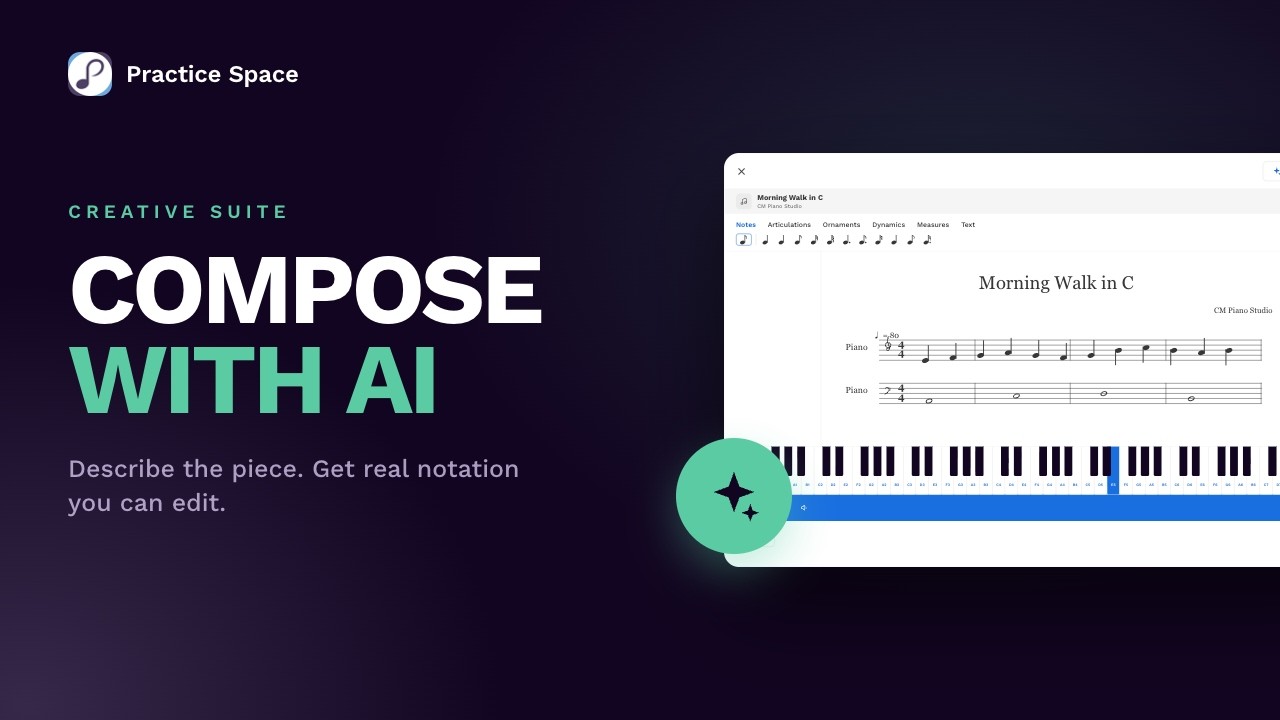
Describe a piece and Practice Space composes it — original pieces, sight reading, rhythm, scales, intervals, chords. Edit the result in a real notation editor.
Flashcards
AI-built sets your students play, with results broken out by concept so you can see exactly what’s shaky.
Unlimited speech to notes
Tap the microphone above any notes field, say what your student should work on, get formatted notes back. No monthly cap.
The catalog
1,000+ pieces across piano, guitar, violin and more. Filter by instrument, composer or level, copy anything to your library, and edit your copy.
Custom avatars & backgrounds
Generate one in 30 seconds. It arrives named, described and ready for your shop, where students redeem it with practice gems.
Build a set on exactly what you covered.
Start from a verified preset, or describe the set you want. Either way, every card lands on a review screen before it saves — so nothing reaches a student you have not seen.
Verified presets, or your own description. Preset sets are built from the theory, so their answers are correct by construction. Describe your own and you get the same review screen to check it.
You choose what is on the cards. Notes, intervals, chords, scales, key signatures or terminology — and the clef, the range, and how many cards.
It goes out as an assignment. Students play it on their phone, and the score posts back to the lesson when they finish.
Weak spots become the next set. Build a follow-up from the cards a student keeps missing.


Compose a piece for a specific student.
Describe the piece, pick the instrument and level, and Practice Space composes it — then turn it into an assignment in the same flow.
Original pieces and drills. Sight reading, rhythm exercises, scales, intervals and chords — the theory content is generated algorithmically, not guessed.
A real notation editor. Change a clef, transpose, rewrite a bar — then save it to your library for good.
The rest of the toolkit.

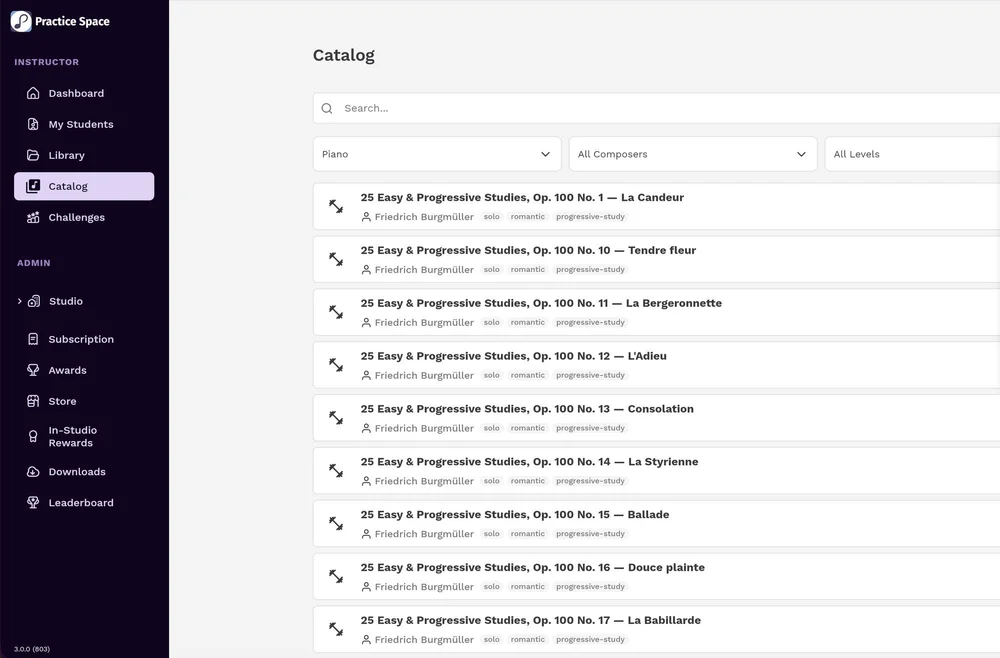


pieces in the catalog, across piano, guitar, violin and more
from a sentence to a full assignment, ready to edit
to generate a custom avatar or background for your shop
Watch each tool work.
Two minutes each. Real screens, no setup.



An add-on to the plan you already have.
Priced by how many teachers are in your studio — one price covers everyone, and every tier includes every tool. Students are never charged, and never have been.
Creative Suite is an add-on. It requires a Practice Space plan, from $15.99 a month — and students are always free.
Every studio gets one 30-day trial. Add it at signup, or switch it on any time from your subscription page.
Generating an assignment, a score, an exercise, an avatar or a background. Speech to notes and copying from the catalog do not count towards it — use those as much as you like.
It’s an add-on, not a plan change. Removing it doesn’t touch your base subscription or your students.
Before you switch it on
-
No. Assignments, lessons, practice tracking, the student app and 20 speech-to-notes a month are all part of your regular plan. Creative Suite is the AI layer on top — the part that saves you the most time.
-
Yes. Creative Suite is in the teacher app on iPhone, iPad and Android as well as on the web — you can generate an assignment between lessons or from the studio floor, not just at your desk. Students see their assignments, record their practice and redeem rewards on their own phone. Turning Creative Suite on happens from your subscription page on the web.
-
Never. Everything comes to you first — you review it, edit it, and decide whether to assign it.
-
Scores, flashcard sets, assignments and rewards you saved stay in your library and stay assignable. What ends is generating new ones — and speech to notes goes back to 20 a month.
-
One tiered price covers your whole studio — every teacher on the account can use it. If your faculty grows into the next tier, the price moves with your seats.
-
The verified presets — note names, intervals, chords, scales, key signatures — are built from the theory rather than guessed, so their answers are correct by construction. A set you describe yourself is generated, so you review the cards before it saves. Nothing reaches a student unreviewed.
Teach more. Prep less.
Add Creative Suite to your Practice Space plan and see what you can build before your next lesson.
Free for 30 days. Students always free.