
Practice Space 3.0 Is Here
Version 3 is the biggest release we've ever shipped. Some of it is free for every studio on Practice Space. Some of it lives in our new Creative Suite add-on. All of it came out of what teachers have been telling us for the past year.
Here's what's new, feature by feature.
Assignment Activity
Free for every studio.
Practice recordings finally have a home.
Here's what we mean. Until now, a student could record a practice video during a session and it would post to their activity feed and land on your dashboard. Useful — but floating. You'd see a student playing something, with no way to tell whether it was the etude you assigned on Tuesday or a piece they were noodling on for fun. The recording had no anchor.
In 3.0, practice recordings live inside the assignment itself.
For students
Practice sessions have a refreshed design. When a student opens an assignment, they'll see the details and attachments exactly like before — plus a new Activity tab.
From there they can record:
Video of themselves practicing that specific assignment
Audio only — new in this release, and a much lower-friction option for a student who doesn't want to be on camera
Same habit as before. It just knows what they were working on now.
For teachers
Nothing goes away: recordings still post to your dashboard the way they always have. But they're also filed in two new places, and each one answers a different question.
In the student's lesson — "how is this student coming along?"
Go into a student's profile, start a new lesson, click into an assignment, and you'll see that student's full history with it: when they marked it complete, and every recording they made across their week of practice. Because it's all stacked under the one assignment, you can follow their progress on that piece over time instead of piecing it together from scattered posts.
In your library — "how is everyone doing with this?"
Open any assignment in your library and see the activity from every student who's been given it — student 1, 2, 3, 4, 5, all in one view. Filter down to a single student when you need to, or scan the whole studio at once to see who's actually practicing it and who isn't.
Why it matters
Two things get noticeably easier.
Lesson prep. Before you build the next lesson, you can see exactly what happened with the last one — not just whether it was marked done, but what it actually sounded like.
Makeup lessons. No more digging through your dashboard hunting for the right video. It's sitting under the assignment, ready to pull up.
This one came directly from a year of teacher feedback. Let us know what you think.
See it in action
Speech-to-Notes
Free for every studio, up to 20 per month. Unlimited with Creative Suite.
You already know what you want to tell the student. The problem is typing it.
It's the end of the lesson, the next student is already in the doorway, and you've got thirty seconds to write up what the last half hour was about. So the notes get short. "Good work. Keep practicing Twinkle." Nobody's fault — that's just what fits in the time you have.
Speech-to-Notes gives you that time back.
How it works
Look for the microphone icon above the text field. Tap it and talk — the same way you'd explain it to the student's parent standing in the hallway. Our AI takes it from there and turns what you said into clean, organized written notes.
You're not dictating. Dictation gives you a wall of run-on sentences with no punctuation. This is processed: your rambling turns into structured, readable notes the student and their family can actually follow during the week.
Where you'll use it
The microphone shows up in a few places around the app, but two matter most:
Lesson notes. This is the broad overview — how the lesson went and what to keep in mind this week. Talk through it out loud and you get a written summary the student can pull up on Thursday night when they've forgotten what you said.
Assignment details. Talk about what you want the student thinking about for Twinkle Twinkle — the left-hand shape, the ritard at the end, whatever you spent the lesson on — and it comes back as a written assignment, ready to send.
What it costs
Every studio gets Speech-to-Notes free, up to 20 per month.
If you're using it every lesson, that ceiling arrives fast. Creative Suite makes it unlimited — talk through every lesson note and every assignment, all month, and never think about the counter.
See it in action
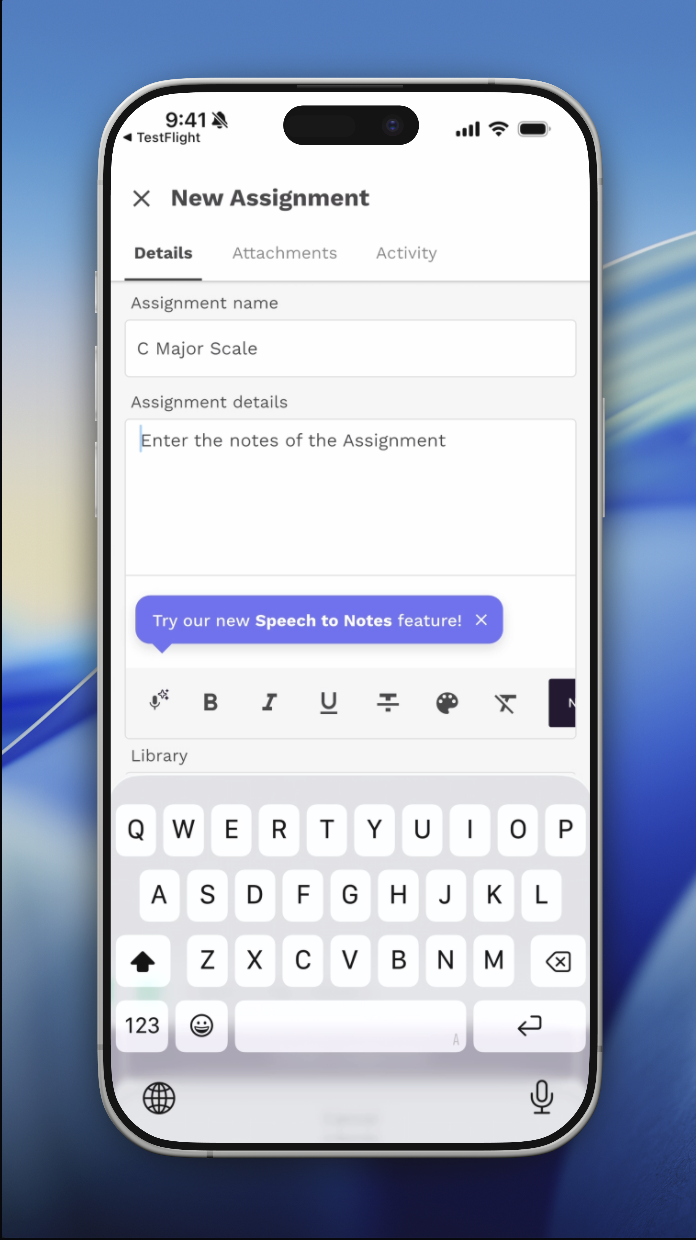
Tap the mic, talk it through, and get notes!
Creative Suite
A paid add-on for any plan. Free 30-day trial.
Everything above is free. This is the part you pay for, and it's the reason we called this release version 3 instead of 2.9.
Creative Suite is a set of AI tools aimed at the slowest part of teaching: making material. Not the lesson itself — you're already good at that. The hours around it. Hunting for a piece at the right level. Writing out an exercise by hand between students. Typing up an assignment for the fourth time this week because four students are all working on the same tricky measure in different ways.
Material made to order
AI Score Creator. Describe what you need and you get it, in seconds. "A beginner piece using the first five notes in C major." "An eight-bar study in 6/8 for a student who keeps rushing."
Every teacher knows this moment: a student needs something specific, nothing in your library is quite right, and your options are to write it yourself on staff paper before the next lesson or to compromise on what they actually need. That's the gap this closes.
Sight Reading Generator. Fresh material, on demand, as much as you want. Sight reading tends to get skipped not because teachers don't value it, but because you run out of things the student hasn't already seen. Now you don't.
Scale, Interval & Harmony Exercise Generator. Build exercises around exactly what one student is working on, instead of handing everyone the same page out of the same book.
A library you can build on
Over 1,000 pieces, covering piano, guitar, violin and more — ready to assign as-is.
The in-app Music Editor is where it stops being a library and starts being yours. Create your own digital sheet music, write original compositions, or take something from the catalog and adapt it. All inside Practice Space, no separate notation software, no exporting and re-uploading.
Assignments that write themselves
Describe the assignment, or upload a piece to your library, and let the AI do the breakdown: the tricky sections, the expression markings, what the student should be listening for. Want composer background or historical context to send along with it? Just ask.
This is also where Creative Suite meets Assignment Activity. The AI writes the assignment; your student records their practice against it; the recordings stack up underneath it for you to review before the next lesson. The whole loop tightens.
Unlimited Speech-to-Notes
The 20-per-month cap disappears. Talk through every lesson note and every assignment, every week, and stop watching the counter.
And to be clear about it: Speech-to-Notes doesn't draw from your monthly AI actions. Unlimited means unlimited.
Make the shop yours
Design custom avatars and backgrounds with AI, and drop them into your studio's shop for students to redeem with practice gems. Studio-specific rewards, seasonal drops, an avatar of the recital piece they just finished — whatever keeps your students coming back to practice.
What it costs
Creative Suite attaches to any plan — no tier upgrade, no migration. Pricing is stair-step based on the total number of teacher seats in your studio, so a solo teacher isn't paying like a twelve-teacher academy:
| Teachers | Per month | Per year | AI actions/mo |
|---|---|---|---|
| 1–3 | $8 | $80 | 100 |
| 4–10 | $20 | $200 | 200 |
| 11–20 | $35 | $350 | 300 |
| 21+ | $50 | $500 | 500 |
Pay yearly and you get two months free.
A quick note on seats. Every Practice Space account comes with one teacher seat included, and you can add more seats as your studio grows. Creative Suite is priced on your studio's total teacher count — so a three-teacher studio pays $8 a month regardless of how those seats were added.
And on AI actions. Generating a score, building an assignment, creating an avatar — each of those is one action. The monthly allotment resets every month, and if a busy month runs you dry, you can top up with an AI action pack rather than waiting it out.
Try it free for 30 days
Studio owners and admins can start the free trial from the subscriptions tab on web. If you're a teacher on someone else's studio account, send them this post.